
Top 3 Odoo Modules to Try in 2026

By 2026, most Odoo setups are no longer “just ERP”. Odoo becomes the place where everything lands: sales orders, deliveries, stock moves, invoices, vendor bills, customer messages… all of it.
And that’s exactly why teams start feeling a bit stuck after a point. Not because Odoo is bad, but because the default screens (lists, pivots, filters) don’t always give you the quick answers you need on a busy day. People end up opening 5 menus, exporting to Excel, and still saying “I’m not sure, I’ll check and tell you”.
So here are 3 modules I’d suggest trying in 2026 (in the exact order you asked). They’re not “nice to have” modules. They solve real problems people complain about daily.
1. Ksolves Ninja Dashboard (Dashboard Ninja with AI)
If you’ve ever heard this in your company:
- “Can we see this KPI daily without digging?”
- “Why does reporting take so long for such simple things?”
- “I just need one dashboard for Sales + Inventory, please…”
Dashboard Ninja is a strong option. It helps you build dashboards with charts, KPI tiles, list views, filters, and date ranges—without turning everything into a custom dev project.
The biggest win is speed: you can quickly create role-based dashboards (sales manager view, operations view, finance view). And the AI part is useful too, because it reduces the “blank page” problem. Instead of starting from nothing, you can generate or suggest dashboard elements based on the model or a keyword.
Where it helps the most
- Sales: tracking pipeline, revenue, quotations, and conversion
- Operations: tracking delivery delays, backorders, stock valuation
- Leadership: dashboards that shouldn’t depend on Excel exports every week
Small but important tip: don’t try to build 25 charts on day one. Pick 6–10 KPIs that matter and keep it clean. Otherwise your dashboard becomes a wallpaper.
2. Inventory Forecasting (TechFinna)
Forecasting is one of those things companies think they do… but practically they do it like this:
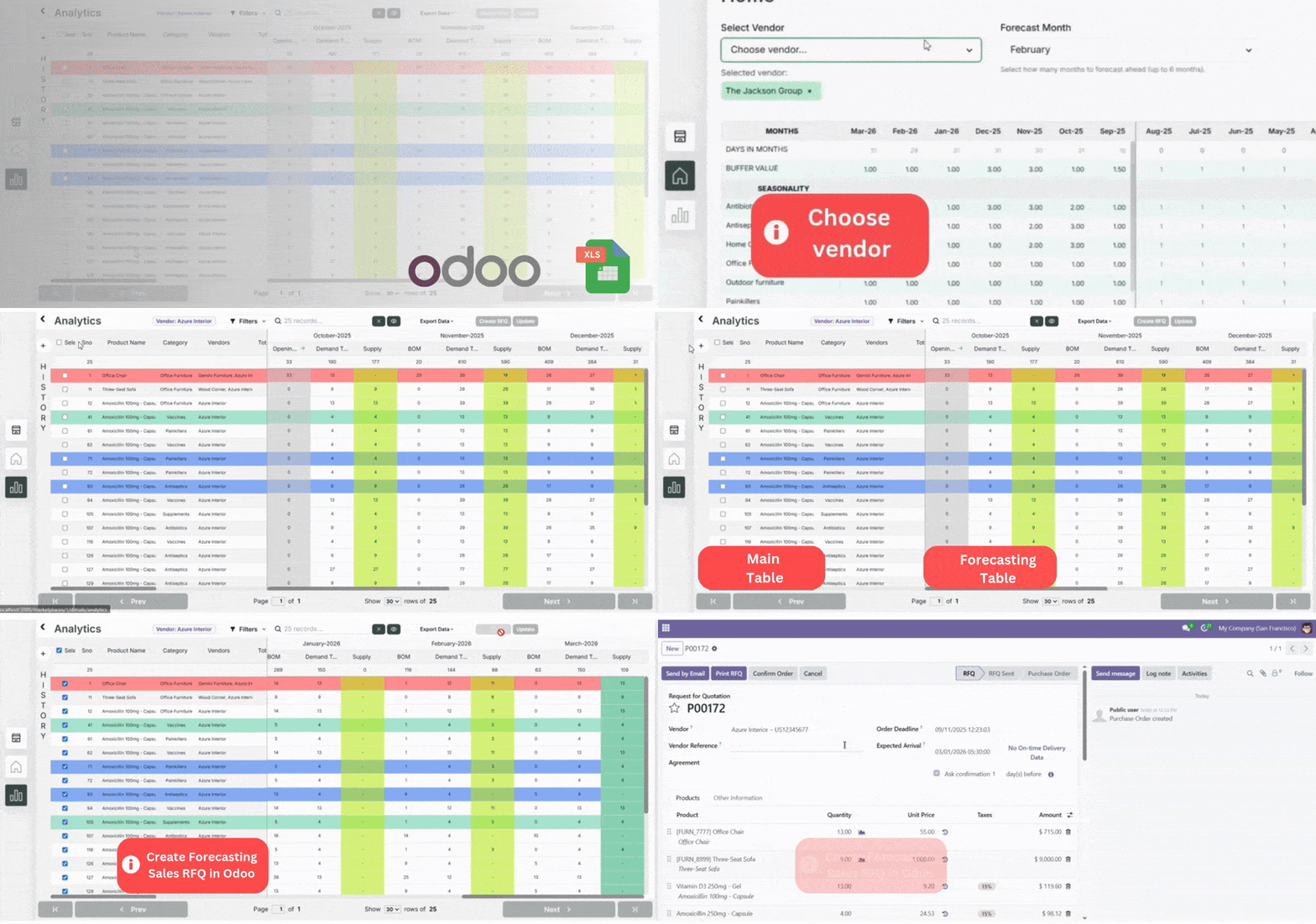
- Predict sales in the future
- Export excel of all tables
- RFQ creation in just 2 clicks
- Advance features to play with inside
TechFinna’s Inventory Forecasting module is meant to make forecasting feel like a proper workflow instead of a monthly headache. The idea is simple: use historical sales data to create forecast, let users adjust based on reality (seasonality, buffer stock, vendor lead times), and give a clean view of history vs inventory vs forecast.
What I like here is it’s not pretending forecasting is “perfect”. It gives you room to override or adjust run-rate when the business changes. That’s how real businesses work anyway.
Where it helps the most
- High-SKU businesses: where manual planning just breaks
- Teams facing stockouts + overstock: the worst combo
- Purchase managers: who need a clear reorder plan, not guesswork
One honest reality check: forecasting can’t fix messy data. If lead times, vendor rules, and product categories are not maintained, results will still look off. Fix basics while implementing forecasting. (Otherwise you’ll blame the tool for a data problem.)
3. Power BI Connector (TechFinna)
Odoo’s built-in reporting is good for operational views, but many teams eventually want Power BI for:
- deeper visuals + drilldowns
- combining Odoo data with other sources (ads, Shopify, support, etc.)
- one “management reporting layer” across departments
The pain is almost never Power BI itself. The pain is always: connection, refresh, and maintaining pipelines. This is where a connector becomes practical. TechFinna’s Power BI connector is positioned as a smoother bridge between Odoo and Power BI, with token-based access, multi-table import, and (if required) SQL-based extraction for advanced use cases.
This is the kind of module you stop noticing once it’s set up correctly — and that’s actually a compliment.
Where it helps the most
- Leadership dashboards: sales, inventory, finance KPIs
- Multi-company reporting: where Odoo views feel limiting
- BI fast: teams who don’t want to build a custom data pipeline
Quick note: If your setup allows SQL querying, restrict it to trusted roles. Don’t make it “available to everyone”, you’ll regret it one fine day.